GazeTune 👁👆
Facilitating Precise Gaze-Driven Interactions
with Cascaded Touch Input
Abstract
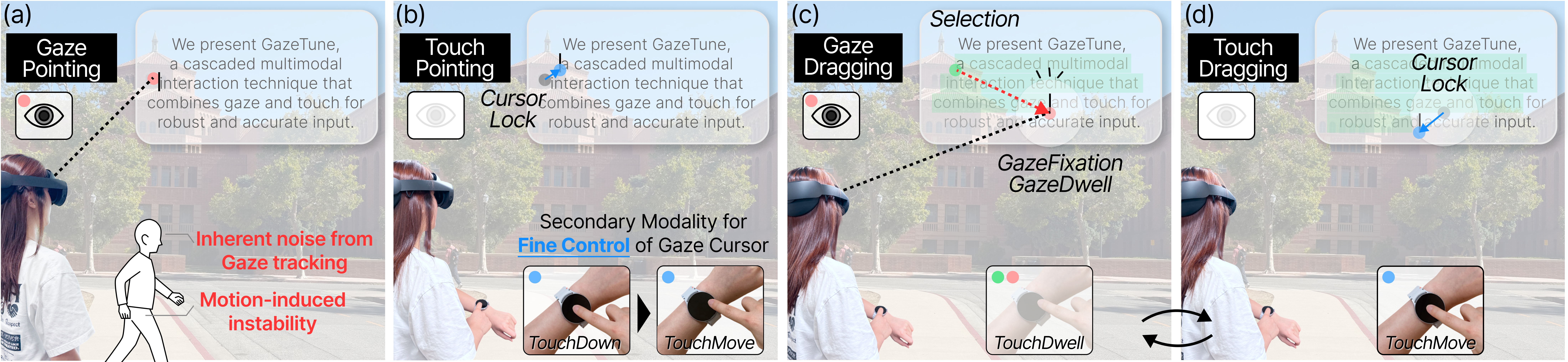
Eye gaze has become an essential input for spatial computing, but its coarse targeting and saccadic nature limit precision and complicate continuous interactions such as dragging, especially under user motion. Gaze+pinch has also become standard in XR for its convenience, yet mid-air gestures remain imprecise, fatiguing, and socially unacceptable. These limitations underscore the need for an approach that preserves the speed of gaze while enabling stable, fine control. We present GazeTune, a cascaded multimodal interaction technique combining gaze and touch to refine gaze-based selection and manipulation. Touch serves as a refinement channel within gaze pointing, allowing precise cursor and target control. Our work investigates how gaze-and-touch enhances dragging and mitigates Motion-Induced instability. In a study (N=20), we compared GazeTune against gaze-only and gaze-pinch methods in 2D dragging. Results show that GazeTune achieves significantly lower error with comparable execution time, validating its effectiveness and balanced trade-off between time and accuracy.
Core Contribution
Cascaded Gaze-and-Touch Interaction Mechanism
- A novel multimodal interaction technique for precise dragging in XR that pairs coarse gaze targeting with fine-grained touch control via a smartwatch while enabling stable, continuous manipulation even during physical movement.
GazeTune Components & Validation
-
Cursor Lock Mechanism: Anchors the cursor for local refinement across two distinct states:
- Pointing Cursor Lock (Touch Down): Triggered upon initial touch down during coarse gaze pointing, locking the cursor to support local touch refinement before selection.
- Dragging Cursor Lock (Fixation): Activated during gaze dragging when gaze fixates, automatically snapping and re-establishing a new refinement anchor.
-
Gaze Scope (Adaptive Gating): A dynamic, pill-shaped region that gates two interaction modes:
- Touch Dragging: Active while gaze remains inside the scope, ignoring gaze positional updates
- Gaze Dragging: Activated when gaze moves outside the scope. Fixating on a new point snaps the cursor anchor to the current gaze position, drastically reducing touchscreen clutching for seamless long-distance dragging.
- Empirical Validation: Evaluated through a user study showing significantly lower dropping error compared to baseline methods, effectively minimizes errors and user workload while preserving the speed advantages of gaze input.
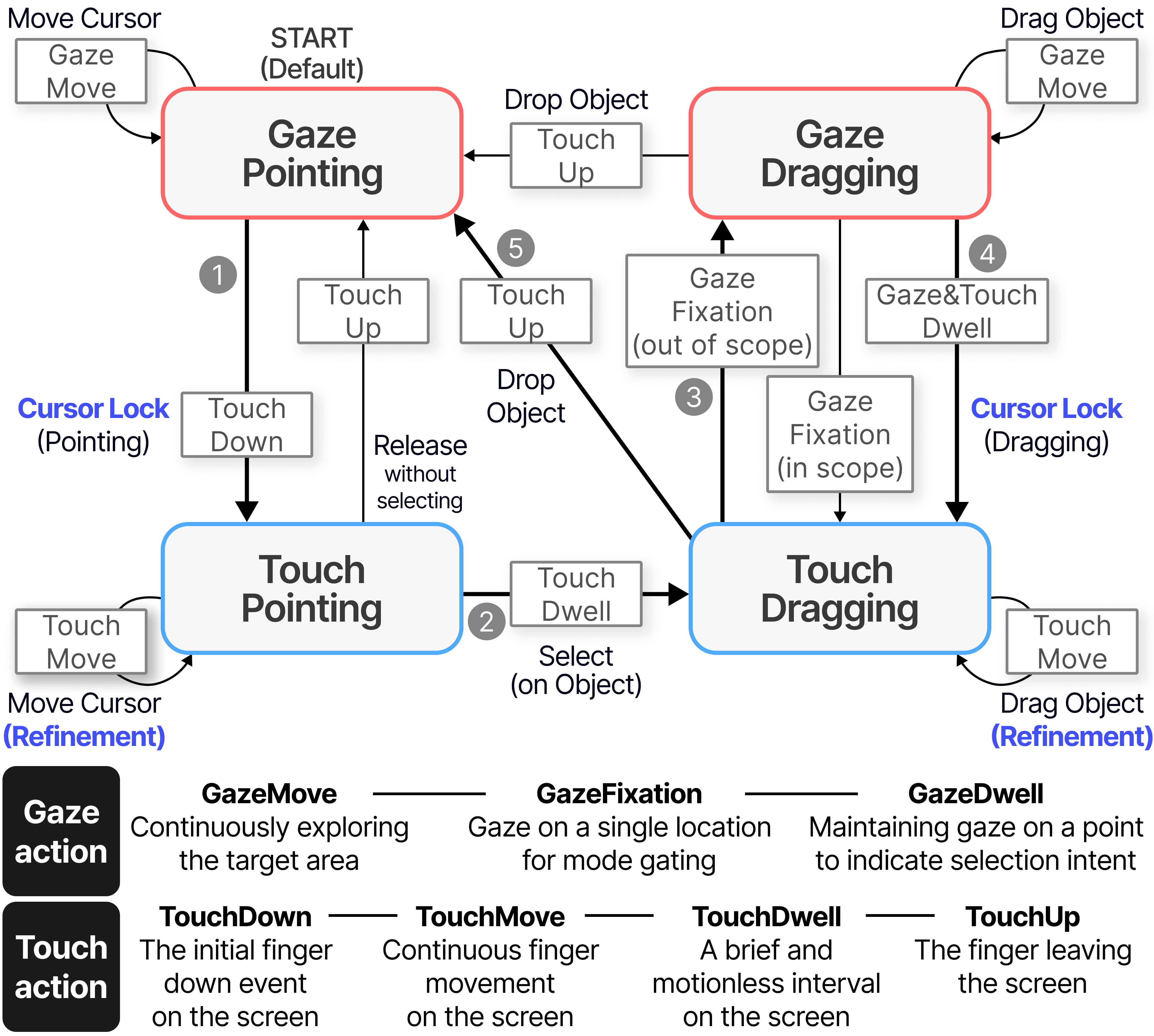
The interaction diagram of GazeTune based on the gaze and touch actions.
All processes can be performed within a single touch sequence
to support two main phases of refinement (Pointing and Dragging).
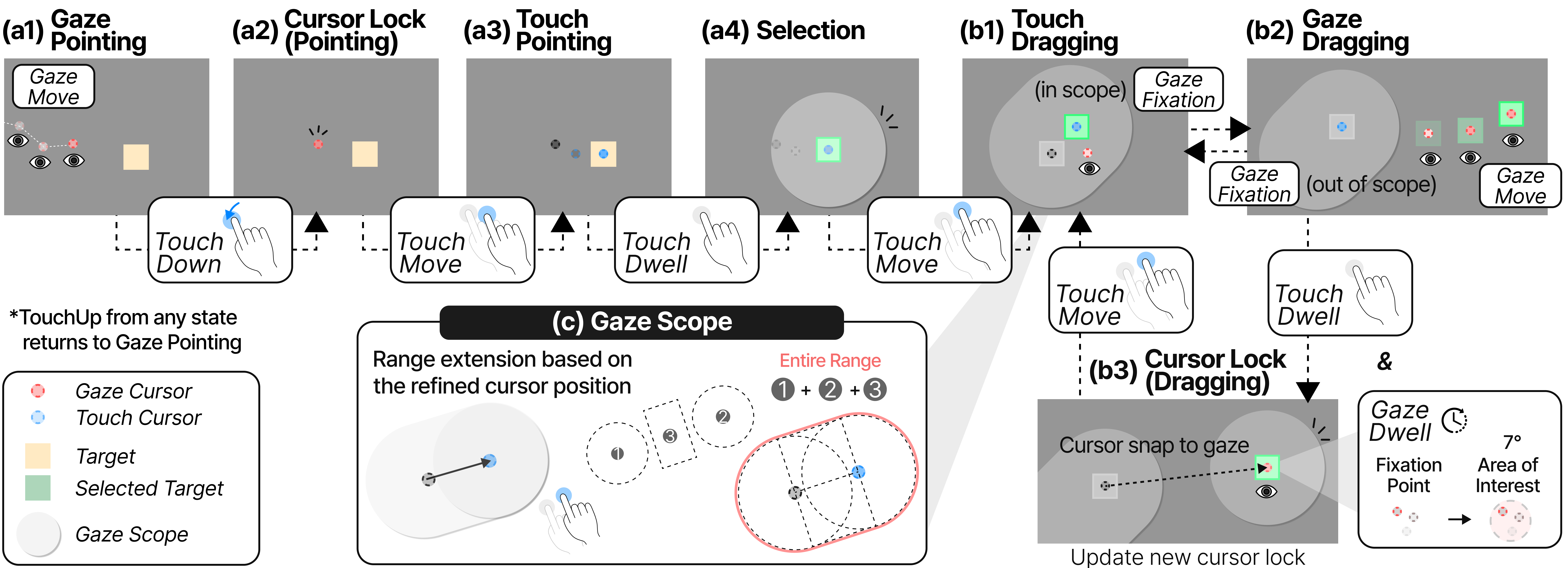
The interaction diagram of GazeTune based on the gaze and touch actions.
All processes can be performed within a single touch sequence
to support two main phases of refinement (Pointing and Dragging).